3 Wire Lights
REVISIONS
- L (12 bit)
- K (12 bit)
- M (12 bit)
- M1 (8 bit)
- R (8 (8 bit)
- R1 (8 bit)
- Be sure to turn the lights off
- Check the directional flow of the lights
- Arrows on the lights point away from the controller
- Cut each wire individually
- Make clean wire connections
- Test the lighting as soon as you complete the jump
- Use program 18 for testing power (all white which pulls the most current of all the programs) and 14 (a moving program to make sure data is getting through to the end)
Short Jumps – Under 20 feet of jumper wire between lights
| Connections from Lights to Jumper Wire at the Beginning of a Jump | ||
| Lights | Function | Jumper Wire |
| Outside Wire – No Red Stripe | Ground | Black and Green Wires |
| Center Wire | Data | White Wire |
| Outside Wire – Red Stripe | Power | Red Wire |
| Connections from Jumper Wire to Lights at the End of a Jump | ||
| Jumper Wire | Function | Lights |
| Black and Green Wires | Ground | Outside Wire – No Red Stripe |
| White Wire | Data | Center Wire |
| Red Wire | Power | Outside Wire – Red Stripe |
Mid Range Jumps – 20 feet to 40 feet of jumper wire between lights
Requires a transmitter but no receiver
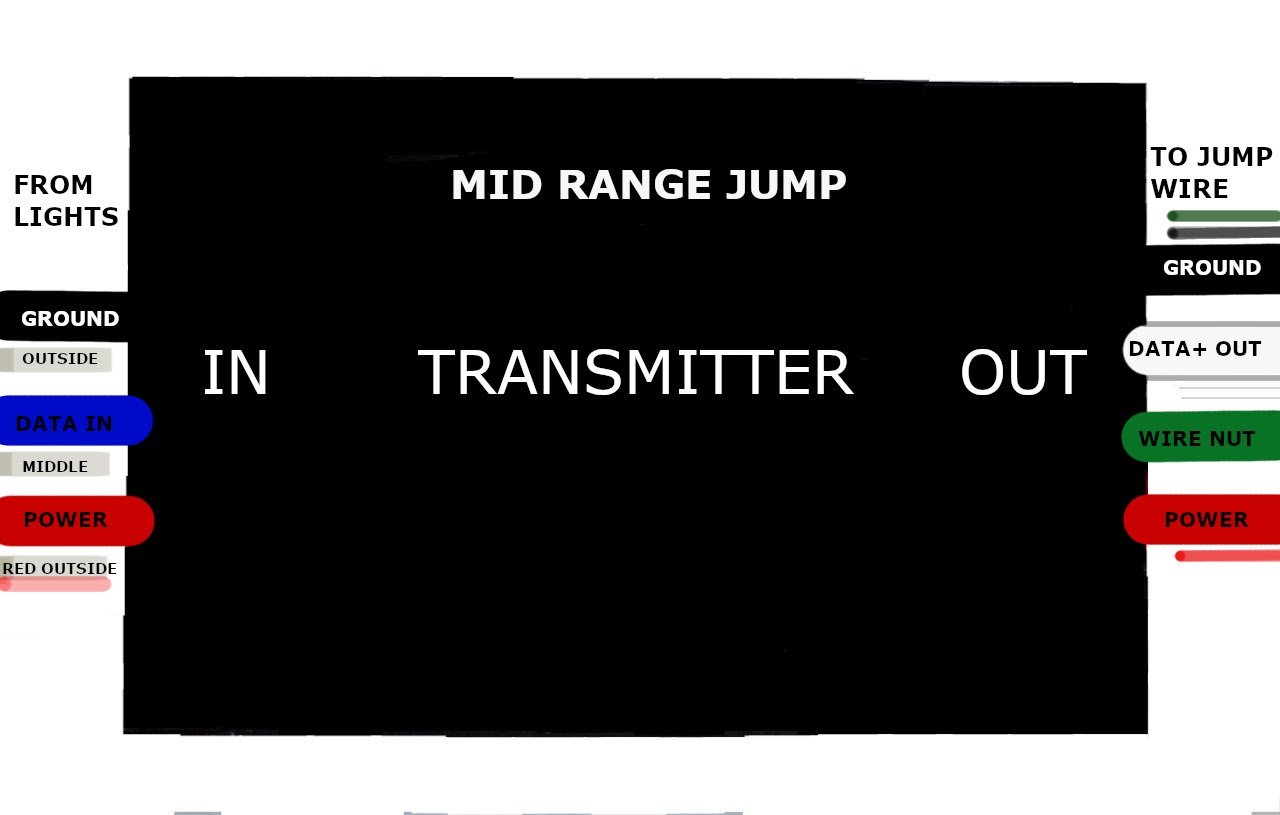
| Connections from Lights to the Transmitter at the Beginning of a Jump | ||
| Lights | Function | 3 Wire Side of Transmitter |
| Outside Wire – No Red Stripe | Ground | Black Wire |
| Center Wire | Data | Blue Wire |
| Outside Wire – Red Stripe | Power | Red Wire |
| Connections from Transmitter to Jumper Wire at the Beginning of a Jump | ||
| 4 Wire Side of Transmitter | Function | Jumper Wire |
| Black Wire | Ground | Black Wire with Green Jumper Wire |
| Green Wire | Not used (Must Plug Green Transmitter Wire With a Wire Nut) | No connection |
| White Wire | Long Range Data (Data+) | White Wire |
| Red Wire | Power | Red Wire |
| Connections from Jumper Wire to Lights at the End of a Mid Range Jump | ||
| Jumper Wire | Function | Lights |
| Black and Green Wires | Ground | Outside Wire – No Red Stripe |
| White Wire | Data | Center Wire |
| Red Wire | Power | Outside Wire – Red Stripe |
Long Jumps – Over 40 feet of jumper wire between lights
Requires a transmitter before the jump and a receiver at the end
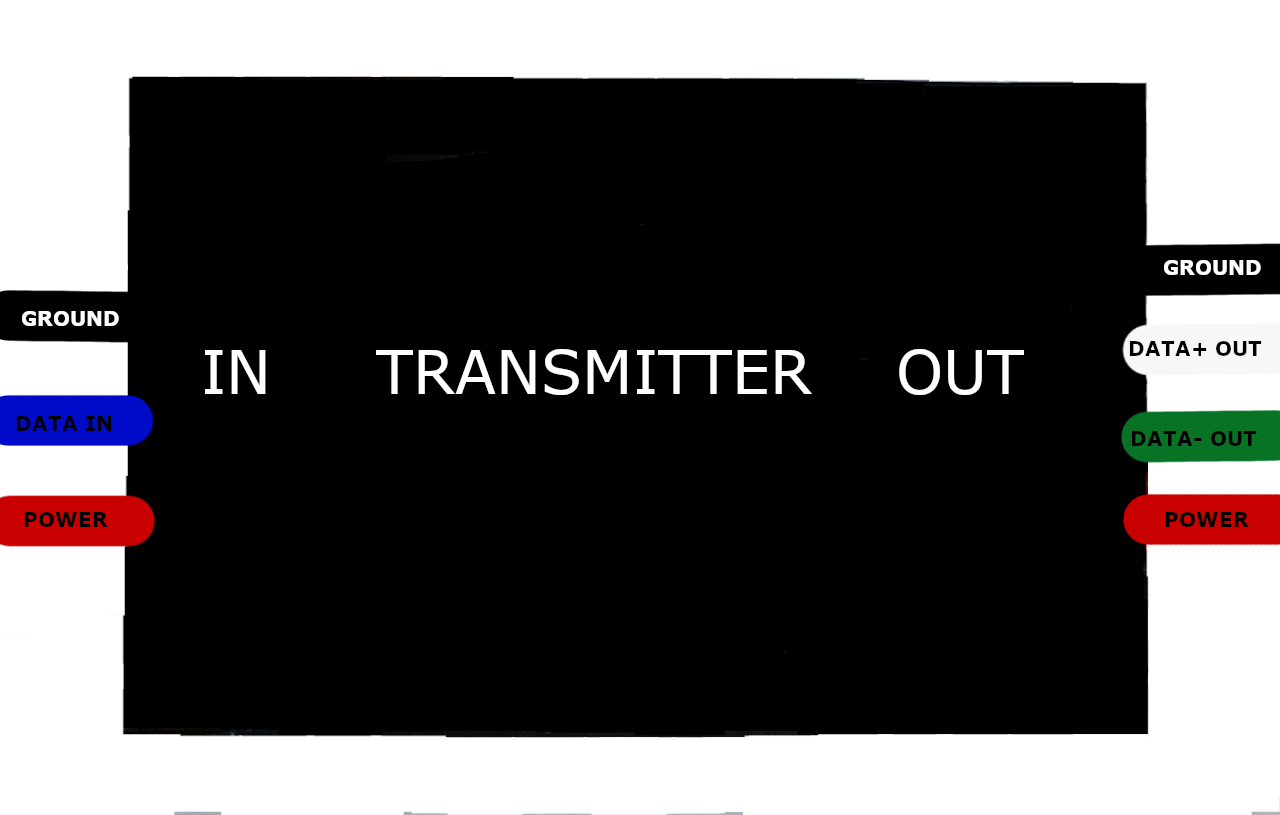
| Connections from Lights to the Transmitter at the Beginning of a Jump | ||
| Lights | Function | 3 Wire Side of Transmitter |
| Outside Wire – No Red Stripe | Ground | Black Wire |
| Center Wire | Data | Blue Wire |
| Outside Wire – Red Stripe | Power | Red Wire |
| Connections from Transmitter to Jumper Wire at the Beginning of a Jump | ||
| 4 Wire Side of Transmitter | Function | Jumper Wire |
| Black Wire | Ground | Black Wire |
| White Wire | Long Range Data (Data+) | White Wire |
| Green Wire | Long Range Data (Data-) | Green Wire |
| Red Wire | Power | Red Wire |
From Lights To Jumper Wire
| Connections from the Jumper Wire to Receiver | ||
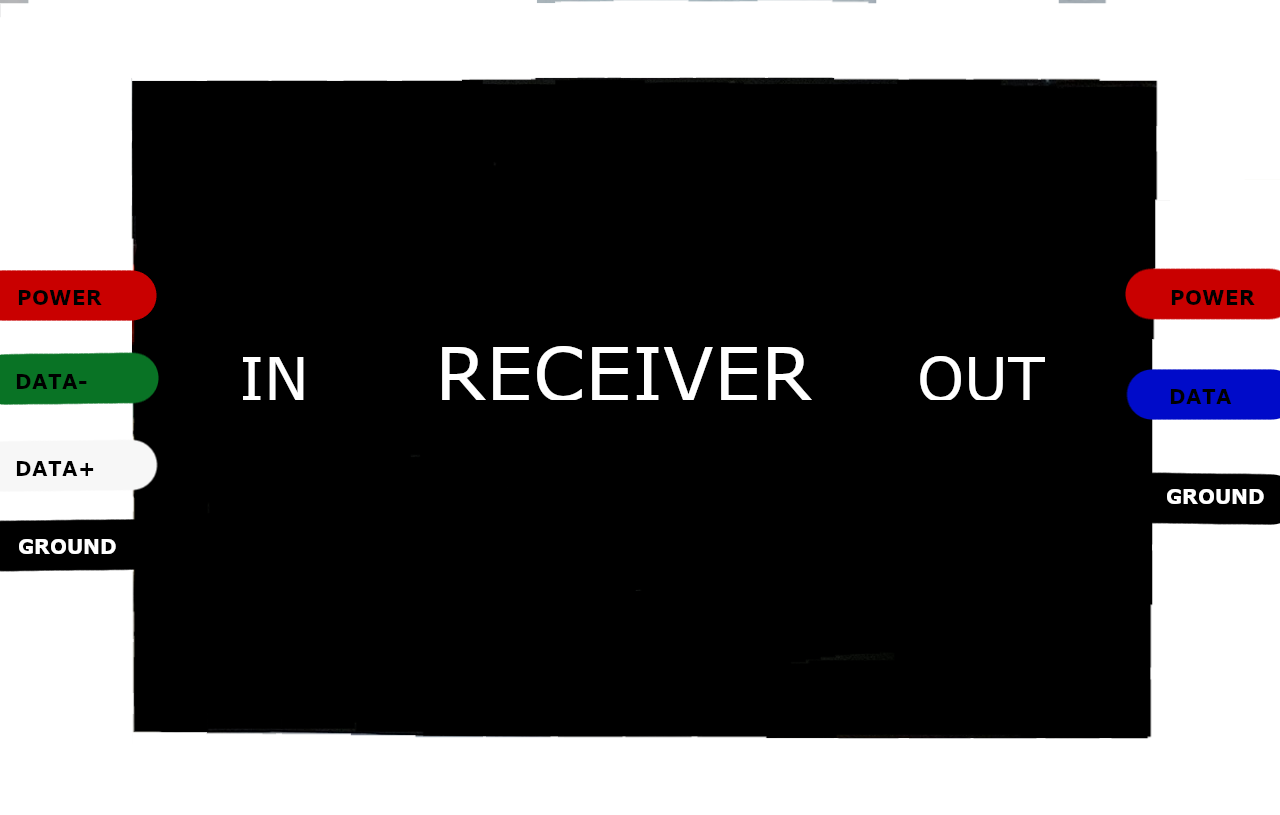
| Jumper Wire | Function | 4 Wire Side of Receiver |
| Black Wire | Ground | Black Wire |
| Green Wire | Data- | Green Wire |
| White Wire | Data+ | White Wire |
| Red Wire | Power | Red Wire |
Make sure arrows on the lights are pointing away from the controller
| Connections from Receiver to Lights | ||
| 3 Wire Side of Receiver | Function | Lights |
| Black Wire | Ground | Outside Wire – No Red Stripe |
| Blue Wire | Data | Center Wire |
| Red Wire | Power | Outside Wire – Red Stripe |